Stem & Multitrack QC Tool for Audio Professionals.
Save time. Be confident in your deliverables.
Launching soon on the Mac App Store.
30-Day Free Trial: Then $4.99/month or $49.99/year • Cancel anytime
Join hundreds of audio professionals using Stem Checker
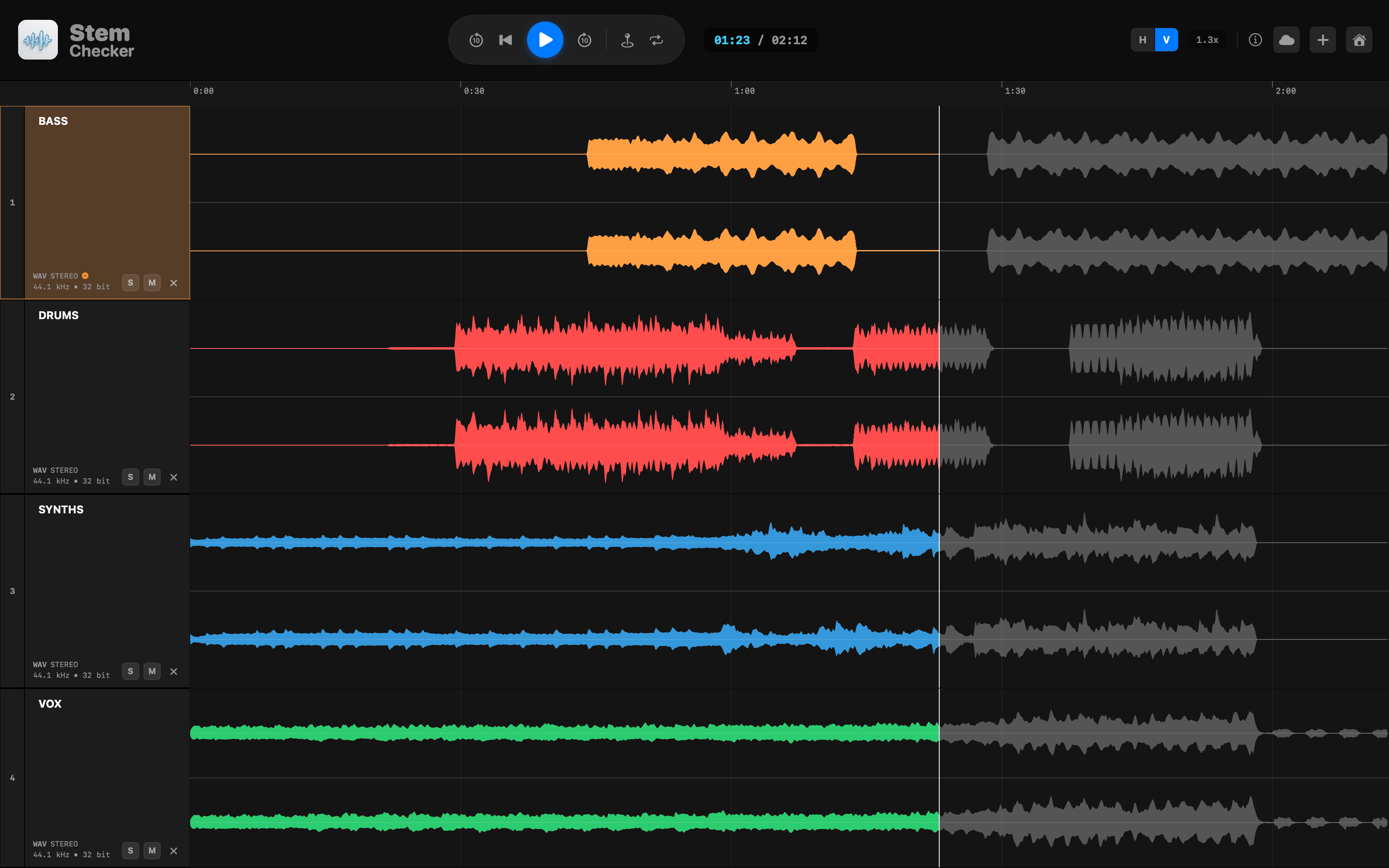
Ever bounced or received stems that just aren't right?
These errors slip through every day—and they cost you time, money, and reputation.
Alignment Mismatch
Stems that don't start at bar 1. They weren't exported from the same point.
Dual-Mono Exports
Stereo files where left and right are identical. Wastes space and confuses panning decisions.
"Audio_01.wav"
Ambiguous filenames that force you to solo every track just to figure out what it is.
Silent Stems
A track that should have audio but is blank—because someone left a mute on or routed it wrong.
Check Coherent Metadata
Mismatched file types can cause issues, such as odd sample rates causing drift. Detect and check metadata is coherent across your files.
Clipping Detection
Digital overs that went unnoticed during export can ruin an otherwise perfect mix.
“These aren't rare edge cases—they happen in 1 of every 3 stem deliveries. And when they slip through, your reputation takes the hit.”
Try the Interactive Demo
Experience Stem Checker with real audio playback, waveform visualization, and all core features right in your browser.

Built for Professional Workflows
Everything you need to verify audio with confidence.
Check Coherent Metadata
Quickly confirm sample rate, bit depth, and format consistency across all stems.
Detect Mismatched Metadata
Instantly spot inconsistencies in file properties that could cause issues during playback or mastering.
Identify Sample Rate Inconsistencies
Flag stems exported at different sample rates before they cause drift or conversion artefacts.
Detect Dual Mono
Identify mono files incorrectly exported as stereo — saving file space and avoiding panning confusion.
Length Mismatches & Missing Audio
Detect stems that don't match in length or contain silent/missing content before delivery.
Clipping Detection
Catch digital overs and clipping that went unnoticed during export — protect your final mix.
Batch Renaming
Smart renaming tools to clean up ambiguous stem filenames instantly.
Dropbox Integration
Import and export stems directly from your cloud storage.
Sync Playback
Sample-accurate playback of multiple stems simultaneously — no DAW required.
Instant Verification in Seconds
01
Drop Your Files
Drag stems directly into Stem Checker from Finder or Dropbox.
Drop Your Files
Drag stems directly into Stem Checker from Finder or Dropbox.
02
Automatic Analysis
Instant waveform rendering and issue detection runs automatically.
Automatic Analysis
Instant waveform rendering and issue detection runs automatically.
03
Verify & Export
Confirm stems are issue free, and export confident deliverables.
Verify & Export
Confirm stems are issue free, and export confident deliverables.
Trusted by Audio Professionals
Join hundreds of engineers who've streamlined their workflow.
Swipe to see more
Frequently Asked Questions
Everything you need to know about Stem Checker.
With Stem Checker, simply drag and drop your stem files into the app or use the file picker. The app instantly analyzes all stems for common issues like length mismatches, dual-mono exports, clipping, and sample rate inconsistencies. You can play back all stems in sync, solo or mute individual tracks, and visually inspect waveforms - all without opening a DAW. Any detected issues appear in the Issues Panel with one-click fixes where applicable.
Stem Checker supports all major audio formats including WAV, AIFF, MP3, FLAC, and AAC. We recommend using lossless formats (WAV/AIFF) for professional stem checking.
No hard limits! Our streaming architecture processes files of any size without loading them entirely into memory. You can check as many stems as you need in a single session.
Our algorithm analyzes the audio data across channels to detect when left and right channels contain identical content. This helps identify mono files that were incorrectly exported as stereo, which wastes file space and can cause issues with panning and stereo processing.
Yes! We have native Dropbox integration, allowing you to import and export stems directly from your Dropbox folders.
Stem Checker is free to download with a 30-day free trial. After the trial, it's $4.99/month or $49.99/year (save 17%). No commitment required - cancel anytime.
Every download includes a full 30-day free trial with access to all features. No credit card required. Try it risk-free and see how it transforms your workflow.
In Stem Checker, the built-in A/B comparison tool lets you compare your stems against a reference mix. This makes it easy to identify missing parts, level differences, or export mistakes before sending files to clients, labels, or mastering engineers.
Start Verifying Stems Like a Pro
Every download includes a full 30-day free trial with access to all features. No credit card required. Try it risk-free and see how it transforms your workflow.
30-Day Free Trial: Then $4.99/month or $49.99/year • Cancel anytime
Launching soon on the Mac App Store