QC Your Stems in Seconds.
No DAW Required.
Save time. Be confident in your deliverables.
The essential tool for checking and organising stems & multitracks.
Intro playing — skip anytime to try the live demo.
Featured in



“It's fast, it's efficient and it does what it sets out to do efficiently and rather elegantly.”
Instant Verification in Seconds
01
Drop your files
Drag stems straight in from Finder or Dropbox — no session setup, no importing.
Analysis starts the moment they land.
See it in action →
Check your stems.
02
Every issue, flagged instantly
Clipping, silent stems, dual-mono exports, duplicates and length mismatches — caught in seconds.
Click any issue to jump to the exact stem, with one-click fixes built in.
See it in action →Worth Reviewing (9)
03
A/B between stems and mix
Compare your separate stem files against a bounced reference — level-matched so you hear real differences.
Reference is auto-detected from the session; Tab to switch between mix and stems instantly.
See it in action →All stems
Reference.wav
04
Smart renaming tools
Rename stems individually inline, or open batch rename to strip prefixes, find & replace, and number a whole delivery.
Preview every change before you apply.
See it in action →Preset
Preview
05
Verify & export
Watch every check turn green once issues are resolved.
Export clean, verified deliverables straight back to Finder or Dropbox.
See it in action →Export
Renamed, verified and ready to send
Ever bounced or received stems that just aren't right?
These errors slip through every day — and they cost you time, money, and reputation.
At least one of these slips into 1 of every 3 stem deliveries.
See how they're caught →Length Mismatch
Stems aren't all the same length — mismatched lengths highlight stems exported from different start points.
↳ Length mismatch detected
At least one of these slips into 1 of every 3 stem deliveries. See how they're caught →
Trusted by Audio Professionals
Join hundreds of engineers who've streamlined their workflow.
Swipe to see more
Everything You Need to Deliver with Confidence
Detection is just the start — fix, rename, compare and ship, all in one place.
Automatic Issue Detection
Clipping, silent stems, length mismatches, sample rate and bit depth inconsistencies, duplicates and dual-mono exports — all flagged in the Issues Panel the moment you drop your files in.
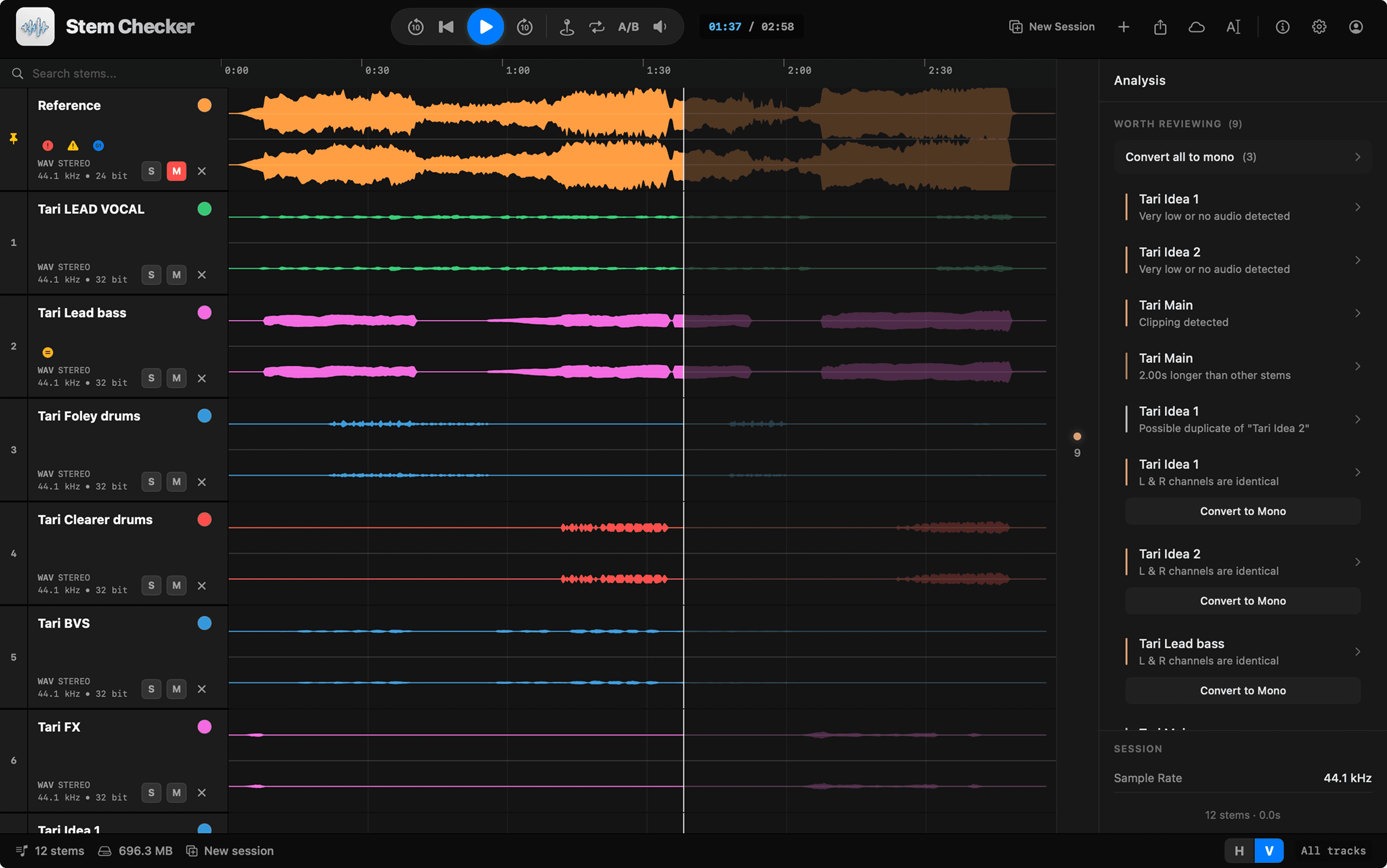
Level-Matched A/B Compare
Compare the combined output of your stems against the reference mix — automatically level-matched, so you hear real differences, not volume.
Batch Rename
Strip prefixes and suffixes, find & replace, and apply your naming convention across every file in one pass.
One-Click Fixes
Convert dual-mono files to true mono directly in the app — no re-export from your DAW needed.
Dropbox Built In
Import stems from Dropbox and upload finished deliverables straight back — without leaving the app.
DAW-Style Playback
Solo, mute, loop and pin tracks with tape-style playback and synced waveforms — no session required.
“If you send or receive stems regularly as part of your work, this simple application will definitely earn its keep.”
Sound On Sound reviewSimple, Honest Pricing
Monthly
First month free — cancel anytime
- All issue detection & one-click fixes
- Level-matched A/B compare
- Batch rename & export tools
- Dropbox integration
- Free updates
Lifetime
One payment, yours forever
- All issue detection & one-click fixes
- Level-matched A/B compare
- Batch rename & export tools
- Dropbox integration
- Free updates
Free to download with two free sessions — pick a plan later, inside the app.
Frequently Asked Questions
Everything you need to know about Stem Checker.
With Stem Checker, simply drag and drop your stem files into the app or use the file picker. The app instantly analyzes all stems for common issues like length mismatches, dual-mono exports, clipping, and sample rate inconsistencies. You can play back all stems in sync, solo or mute individual tracks, and visually inspect waveforms - all without opening a DAW. Any detected issues appear in the Issues Panel with one-click fixes where applicable.
Stem Checker supports all major audio formats including WAV, AIFF, MP3, FLAC, and AAC. We recommend using lossless formats (WAV/AIFF) for professional stem checking.
No hard limits! Our streaming architecture processes files of any size without loading them entirely into memory. You can check as many stems as you need in a single session.
Our algorithm analyzes the audio data across channels to detect when left and right channels contain identical content. This helps identify mono files that were incorrectly exported as stereo, which wastes file space and can cause issues with panning and stereo processing.
Yes! We have native Dropbox integration, allowing you to import and export stems directly from your Dropbox folders.
Stem Checker is free to download and includes two free sessions with all features. After that, choose $3.99/month (your first month is free) or a $29.99 one-time lifetime purchase. You can cancel the monthly subscription anytime.
Yes — every download includes two free sessions with access to all features, no credit card required. If you then choose the monthly plan, your first month is free.
In Stem Checker, the built-in A/B comparison tool lets you compare your stems against a reference mix. This makes it easy to identify missing parts, level differences, or export mistakes before sending files to clients, labels, or mastering engineers.